Time Tracker for Mac OS X
myMacTime is designed for anyone who wants to keep track of the time spent working on specific tasks with little effort. Time logging can increase your personal productivity. The best way to manage your time better is to know how you spend your time.
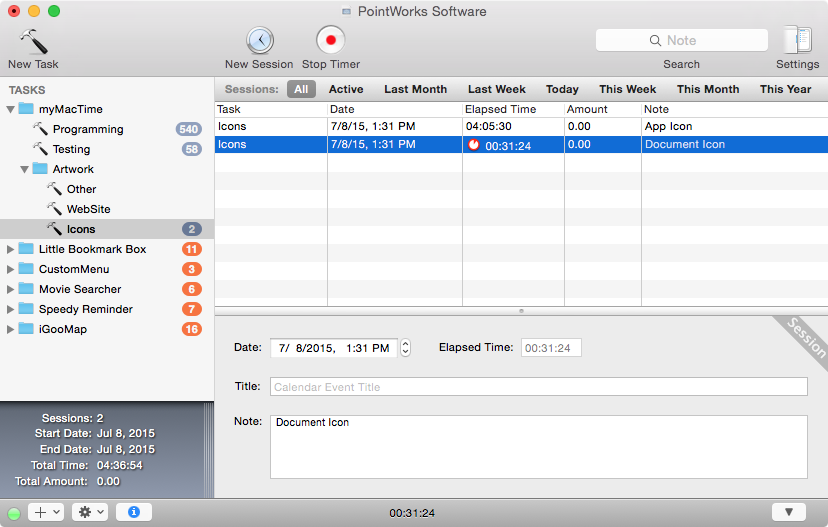
Track your time from any Application
Using the status menu, you can control your timers, switch between projects and different tasks from any application. The status menu allows you to simply record the time for any activity throughout the day.
Track the time spend working with Applications
Associate applications to tasks and your application usage will be automatically tracked. Learn how much time you actually use for each application in a given day, month or year.
Document based architecture
The document based architecture lets you save your project files wherever you want e.g. on your Dropbox.
Drag & Drop just everywhere
Use drag & drop or copy & paste within projects or between projects to manage and organize your tasks and working sessions, or to export your data easily to other applications.
Quick Summary
Just select tasks or folders to see a session summary. Analyze how you actually spent your time and how much money you made.
2-Way Calendar Synchronization
You can synchronize your working sessions with the Calendar App for printing and sharing or import existing Calendar events. Using myMacTime, you can even batch edit your Calendar events.
More Features
- Easy to use, intuitive and Mac-like user interface.
- Drag & Drop or Copy & Paste to organize or export your tasks and sessions.
- Option to auto-hide the project windows in the background.
- Create multiple documents to track your app usage and tasks at the same time.
- Use customizable global hotkeys to control the timer.
- Idle detection with several options.
- Option to continue timing even when your Mac sleeps.
- Batch editing of tasks and sessions. Change the values (e.g. hourly rate, note) of multiple tasks and sessions at once.
- Concurrent timings across projects.
- Track your time manually or using the session timer.
- Automatic application tracking.
- Automatic time rounding.
- You can use different hourly rates for each task.
- Tasks can indicate overdue.